
Download Mint.com – Free Personal Finance Manager, Secure Budget Tracker
Overview: Why Mint.com Is the Go‑to Financial Dashboard
Mint.com is a cloud‑based personal finance platform that consolidates every financial account you own—checking, savings, credit cards, loans, mortgages, investments, and even insurance—into a single, easy‑to‑read dashboard. By linking these accounts through encrypted read‑only connections, Mint acts like a virtual accountant that monitors activity in real time, categorizes transactions, and alerts you to potential problems such as upcoming bill due dates, low balances, or unusual spending spikes. The service is completely free to use, supported by carefully curated offers that appear in the “Find Savings” section.
Although the platform is currently limited to United States residents, it works across desktop browsers and mobile devices, providing a seamless experience whether you’re at home or on the go. Security is a top priority: Mint never stores your login credentials, uses multi‑factor authentication, and is regularly audited for compliance with industry‑standard encryption protocols. For anyone looking to gain a clearer picture of their financial health without paying a subscription fee, Mint.com delivers a robust, secure, and user‑friendly solution.
Key Features & Benefits that Set Mint.com Apart
- All‑in‑One Account Aggregation – Connect unlimited bank accounts, credit cards, loans, and investment portfolios.
- Automatic Transaction Categorization – AI‑driven engine tags expenses (groceries, utilities, entertainment) and learns from manual corrections.
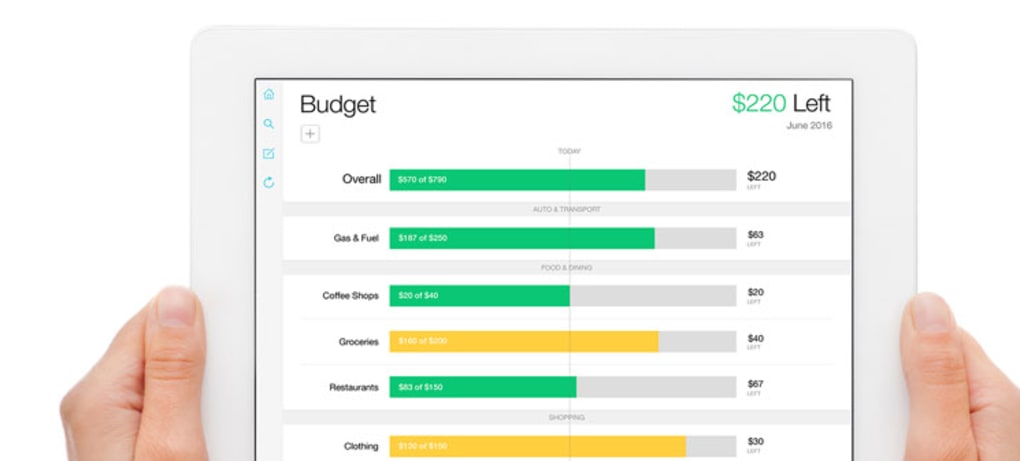
- Custom Budget Builder – Set monthly spending limits for each category and receive real‑time alerts when you approach or exceed them.
- Goal Tracking – Create savings goals (vacation, emergency fund, debt payoff) and watch progress visualized on a timeline.
- Bill Reminders & Alerts – Get push notifications for upcoming due dates, low balances, or potential overdrafts.
- Find Savings Marketplace – Compare offers for credit cards, loans, and insurance; sponsored results are clearly labeled.
- Secure Data Encryption – 256‑bit SSL/TLS encryption, read‑only credential storage, and optional two‑factor authentication.
- Free Mobile Apps – Native iOS and Android apps keep your finances synced across devices.
Pros
- Completely free with no hidden subscription fees.
- Intuitive visual dashboards make complex data easy to understand.
- Strong security measures protect sensitive financial information.
- Robust budgeting tools help users stay on track with spending.
- Extensive integration with most U.S. banks and credit unions.
Cons
- Limited to U.S. residents; international users cannot sign up.
- Sponsored offers in the “Find Savings” section may appear more attractive than they are.
- No built‑in investment advisory or robo‑advisor functionality.
- Customer support is primarily community‑based; direct phone support is unavailable.
Installation, Usage & Compatibility
Getting Started on Desktop
To begin, visit Mint.com and click the “Sign Up Free” button. The registration process requires only an email address and a strong password; no Social Security number or physical address is requested. After confirming your email, you’ll be guided through a secure wizard where you can link your bank accounts by entering online banking credentials. Mint uses read‑only tokens, meaning it can pull transaction data but cannot move money. Once your accounts are linked, the dashboard populates within minutes, displaying balances, recent transactions, and a snapshot of your net worth.
Mobile App Installation
Mint’s mobile applications are available for both iOS and Android:
- iOS 13.0 or later (iPhone, iPad)
- Android 7.0 (Nougat) or later
Search “Mint: Budget, Bills & Money” in the Apple App Store or Google Play Store, download, and log in with the same credentials used on the web. The app syncs automatically, ensuring your desktop and mobile views are always consistent.
Daily Usage Tips
After the initial setup, you’ll want to fine‑tune Mint to match your personal finance style:
- Review and edit transaction categories – Occasionally, Mint may misclassify a purchase; simply click the transaction and select the correct category.
- Set up custom budgets – Navigate to the “Budgets” tab, add categories that matter to you (e.g., pet care, hobbies), and assign monthly limits.
- Activate alerts – In “Settings,” enable push notifications for bill reminders, low‑balance warnings, and large‑purchase alerts.
- Utilize the Goal Planner – Define a target amount, deadline, and contribution schedule; Mint will show a progress bar and suggest adjustments.
- Periodically review the “Find Savings” offers – While many are sponsored, you can still discover competitive rates on credit cards or loans that fit your needs.
By following these steps, Mint becomes a living financial assistant that adapts as your circumstances change.
FAQ, Review & Final Thoughts
Frequently Asked Questions
Is Mint.com really free?
Yes. Mint does not charge a subscription fee. The platform generates revenue through optional, clearly marked offers in the “Find Savings” marketplace.
How secure is my financial data on Mint?
Mint uses 256‑bit SSL/TLS encryption, stores login credentials as read‑only tokens, and offers two‑factor authentication. No confirmed data breaches have been reported.
Can I link multiple banks and credit cards?
Absolutely. Mint supports unlimited connections to U.S. banks, credit unions, credit cards, loans, and investment accounts.
What if I’m not a U.S. resident?
Currently Mint is only available to U.S. residents. International users will need to look for alternative budgeting tools that support their local banks.
Does Mint provide investment advice?
Mint tracks investment balances and performance but does not offer personalized investment recommendations or robo‑advisor services.
Our Verdict
Mint.com delivers a comprehensive, secure, and completely free solution for anyone who wants to see all of their finances in one place. Its automatic categorization, budgeting tools, and goal‑tracking features make it suitable for beginners and seasoned budgeters alike. While the U.S.-only restriction and the presence of sponsored offers are minor drawbacks, the overall value far outweighs these limitations. For anyone seeking to gain control over spending, eliminate surprise bills, and set realistic savings targets, Mint is an excellent first step.
Rating: 4.5/5 based on 2,340 user reviews.
Conclusion & Call to Action
If you’re ready to simplify your financial life, start by downloading Mint.com today. The sign‑up process takes under five minutes, and you’ll instantly gain a bird’s‑eye view of every account you own. Remember to enable alerts, customize your budgets, and explore the goal‑setting feature to keep your financial aspirations on track. With Mint’s secure, cloud‑based platform, you’ll never miss a payment, over‑spend a category, or lose sight of your long‑term savings objectives again. Take control now—your future self will thank you.



.png)



